Cairn
Free & open source

Think clearly.
Ship faster.

Cairn is a local-first project management app with AI built in. No account. No cloud. No subscription.
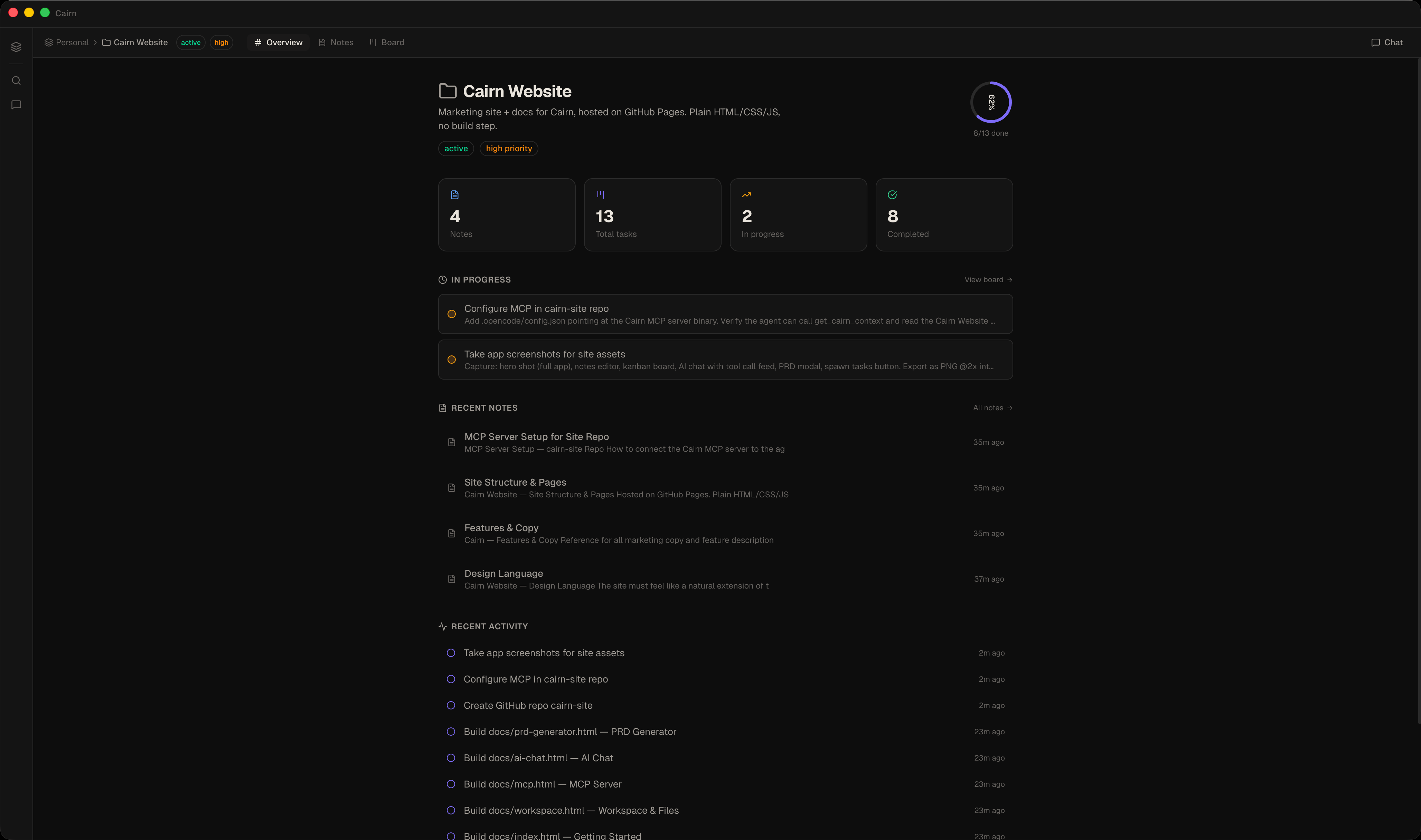
Cairn app screenshot

Yours, completely

Everything lives in plain markdown files on your machine. No cloud, no account, no lock-in.

AI that works offline

Chat with your project, generate PRDs, spawn tasks — natively offline with llama.cpp on-device models, or through your own AI endpoint.

Fast by design

SQLite-backed, Electron-native. Opens instantly. Works without internet.

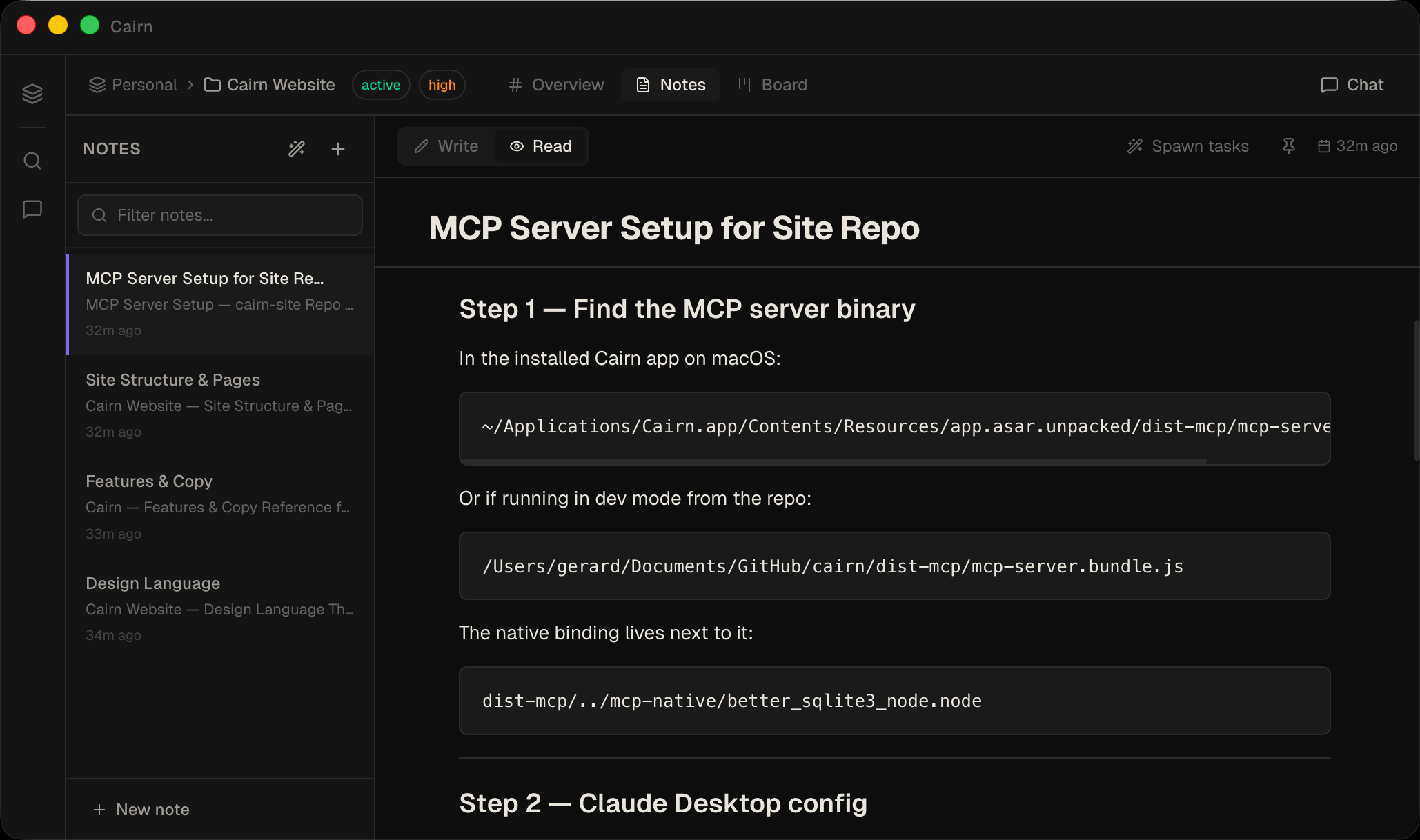
Notes

Markdown that actually belongs to you

A full markdown editor with a formatting toolbar, inline selection preview, and a dedicated read mode. Every note is a plain .md file with YAML frontmatter — readable and editable in any text editor, forever.

  • Formatting toolbar — bold, italic, highlight, code, headings, lists, task lists, code blocks, dividers
  • Inline selection preview — renders your selection in real time without leaving the editor
  • Read mode with floating table of contents and clickable heading anchors
  • Colour swatches — hex and RGB values in code spans get a small colour dot in read mode
  • Syntax highlighting for 100+ languages in fenced code blocks
  • Math rendering via KaTeX — inline $…$ and display $$…$$
  • Callouts — Obsidian-style [!NOTE], [!WARNING], [!TIP] and more
  • Live Preview — markdown markers hide as you type, so notes look rendered while you write
  • Distraction-free fullscreen (⌘.) hides the notes list so the editor fills the window
  • Reusable templates with {{date}} / {{title}} placeholders — Meeting Notes, Weekly Review, Daily Standup starters
  • Export a note — or a whole project — to Markdown or PDF
  • AI text actions: rephrase, summarize, expand, fix grammar, change tone, custom
  • External edits to the .md file sync back automatically
  • Pick your accent — ten curated colour presets, tuned for light and dark themes
Read the editor docs
Notes editor
Kanban

A board that stays out of your way

Drag-and-drop task cards across configurable columns. Priority, due dates, and note links — without the ceremony.
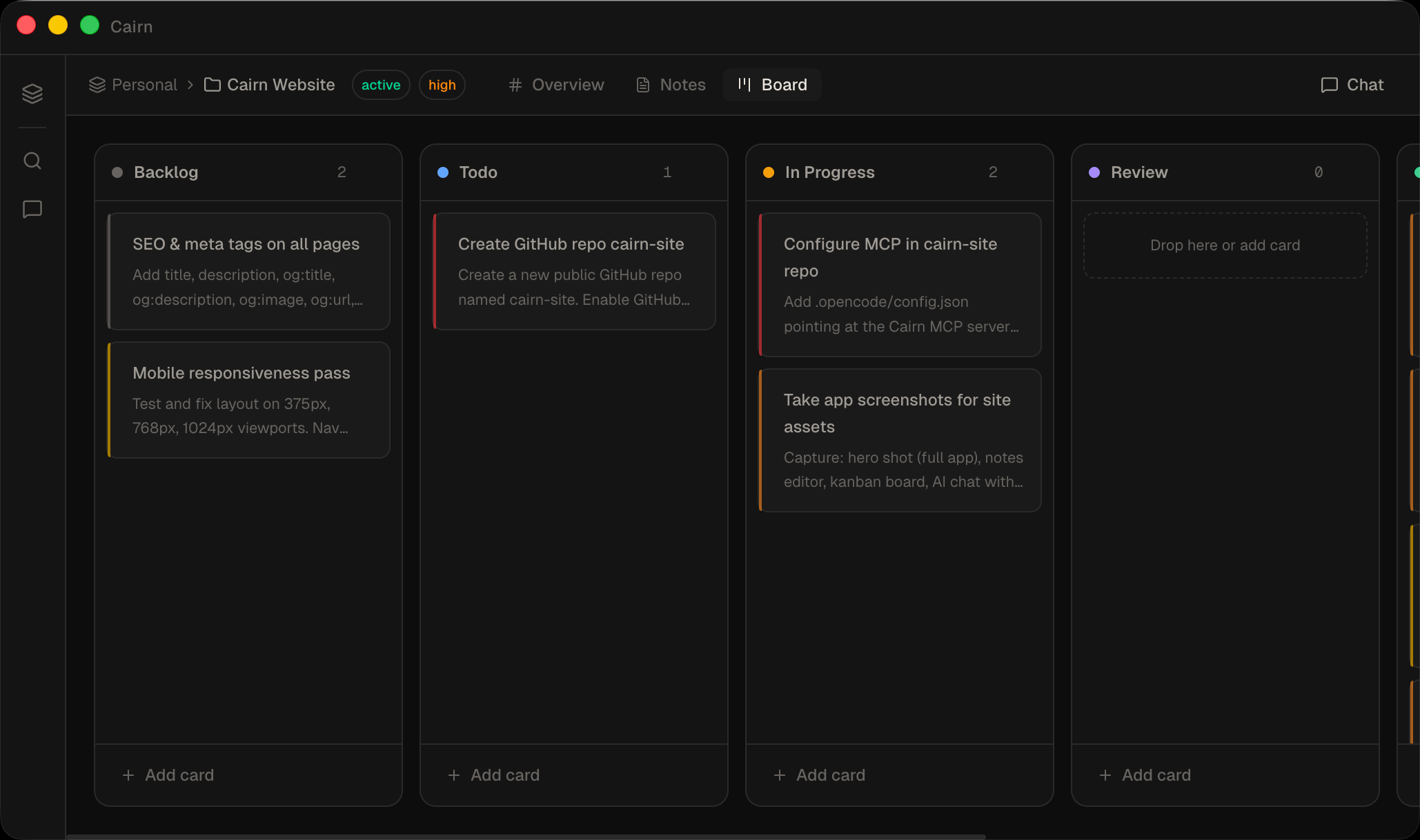
  • Default columns: Backlog, Todo, In Progress, Review, Done
  • Priority levels: low / medium / high / urgent
  • Due dates and card-to-note linking
  • AI can create and move cards via chat
Read the board docs
Kanban board
Calendar

Schedule by due date, drag to reschedule

A project-scoped calendar that lays out your task cards by due date. See what's overdue at a glance, drag any task onto a different day, and pull unscheduled work onto the grid.
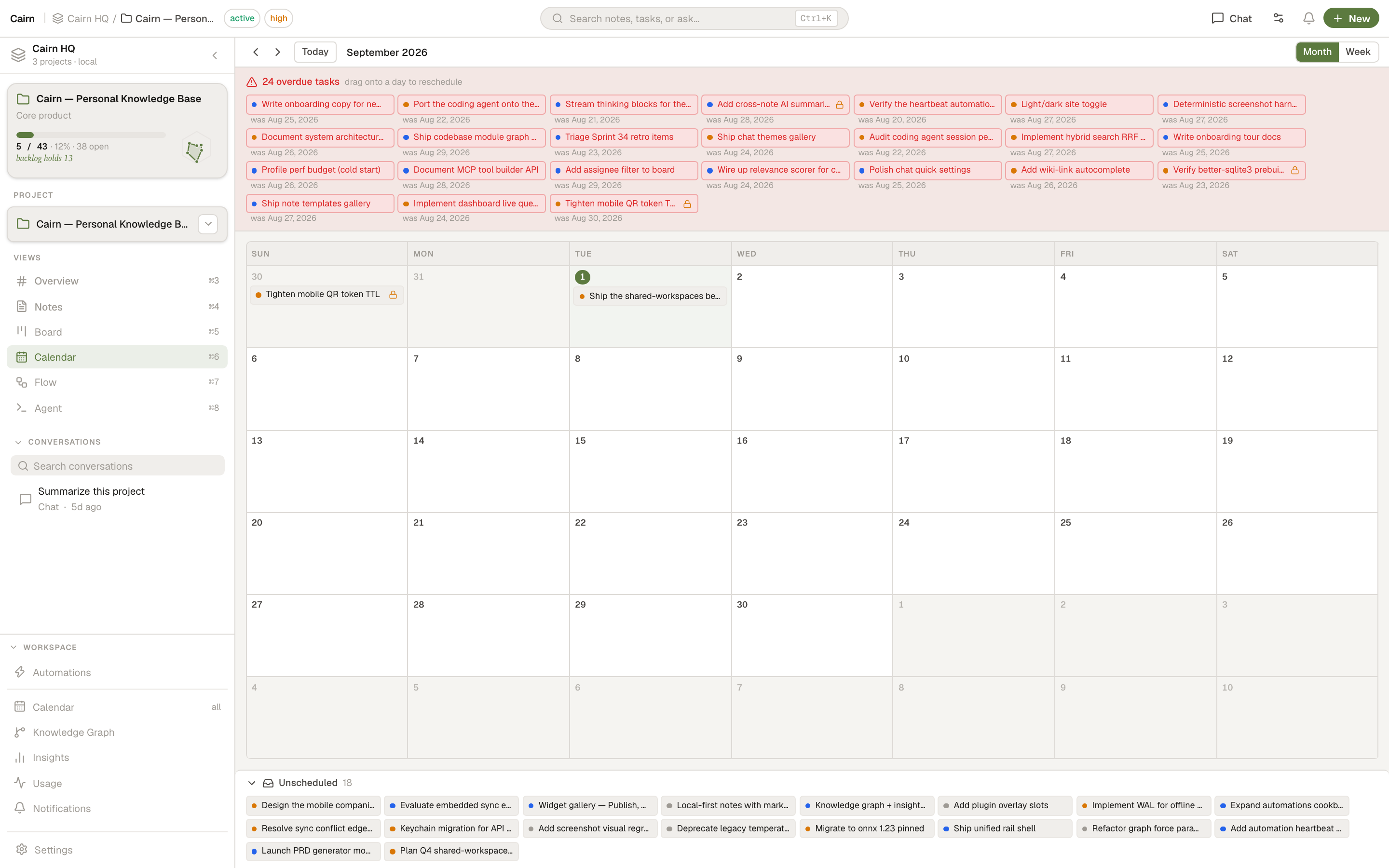
  • Month and week layouts with prev / next / today navigation
  • Drag to reschedule — optimistic and fully undoable
  • Overdue tray highlights every past-due task; drag one onto a day to reschedule
  • Unscheduled tray for tasks with no due date; drag back to clear a date
  • Per-priority colours and a "+N more" day detail for packed days
Read the Calendar docs
Calendar month view
Agent

A coding agent that lives inside your project

Cairn ships a built-in stateful coding agent. Point it at your codebase, give it a task, and it reads files, writes code, runs commands, and keeps your board and notes updated as it works — all without leaving the app. No CLI binary required.
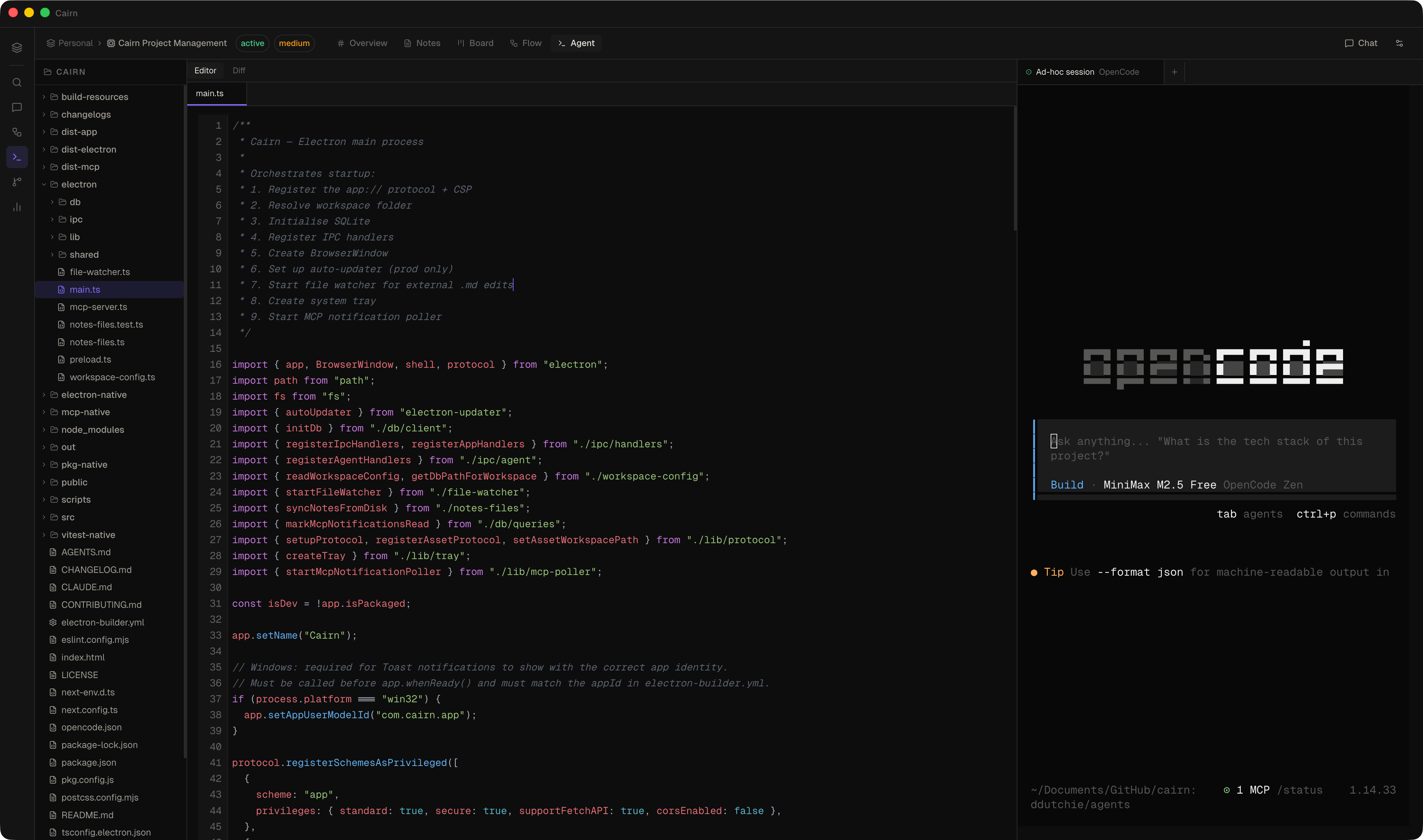
  • Spawn from a task card or ad-hoc — prompt pre-filled from the card title and description
  • Tool chips show exactly what the agent read, wrote, or ran — with live spinners and pass/fail state
  • Cairn-aware — creates and updates notes, moves task cards, and links output back to your board automatically
  • Subagents — the agent can spawn focused child agents for deep sub-tasks; each subagent is collapsible inline
  • Context usage ring — visual token counter in the chat header so you always know where you stand
  • Works with On-Device Llama (via integrated llama.cpp), or any OpenAI-compatible endpoint — OpenAI, Anthropic, Ollama, LM Studio
  • External binary support — also run Claude Code, OpenCode, Aider, or any CLI tool in a live xterm.js terminal with the full file tree, multi-file editor, and git diff viewer alongside
Read the Agent docs
Agent workspace
AI Chat

An AI that can actually do things

Chat with your project in a persistent side panel. The AI reads notes, creates tasks, moves cards, and writes PRDs — live, with a tool call activity feed so you see exactly what it's doing.
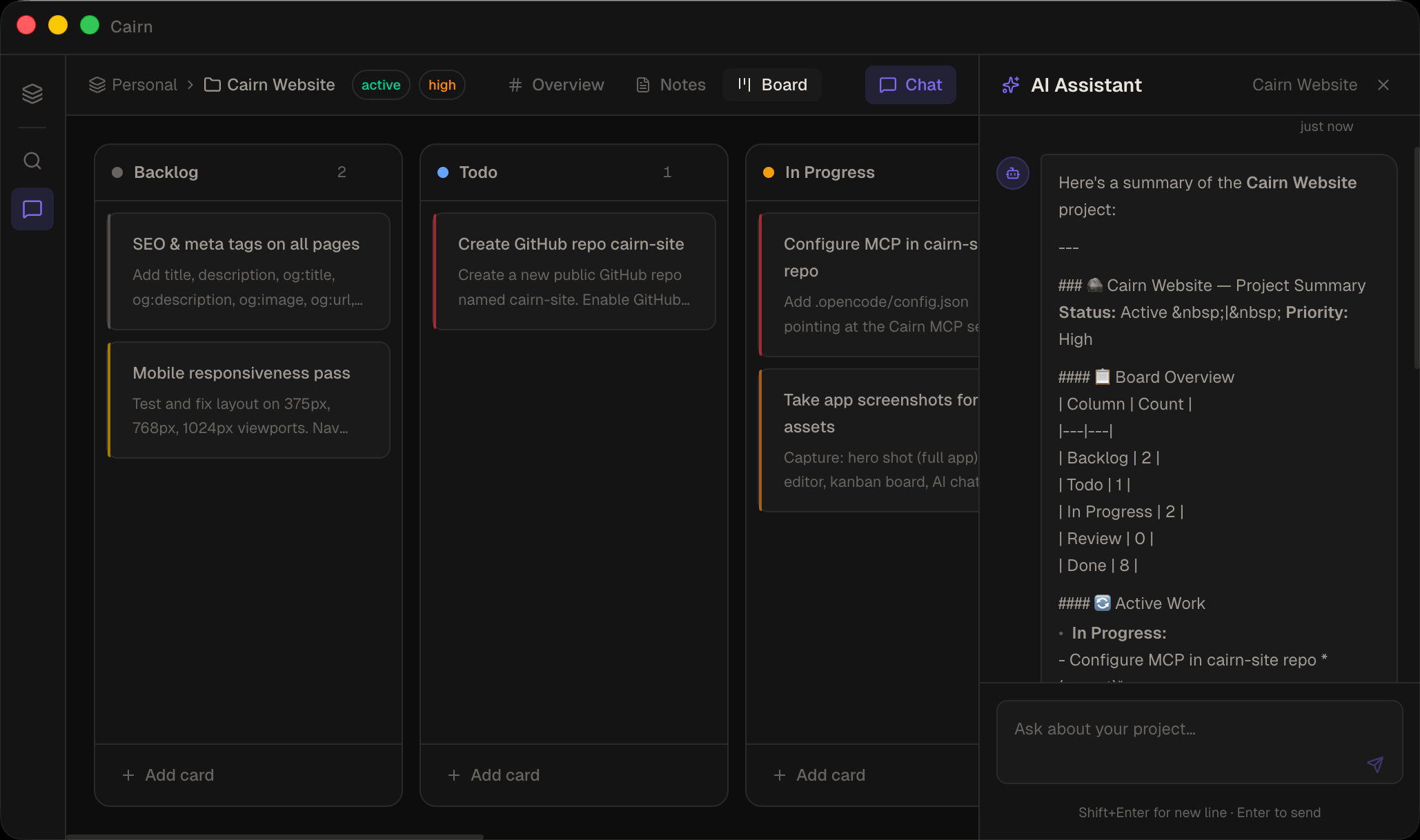
  • On-Device Llama — private, offline, highly optimized GGUF inference powered by llama.cpp
  • OpenAI, Ollama, LM Studio — any compatible endpoint
  • Saved providers — store several connections and switch active one in a click; keys in your OS keychain
  • Community AI providers — install ready-made provider presets from the catalog, just add your key
  • Attach images & PDFs — send screenshots or documents straight to the model
  • External tools — reach out to remote MCP servers & HTTP APIs (with OAuth) right from chat
  • Reasoning streams — watch the model think in collapsible blocks, with a token-usage ring
  • Subagents — route research and writing through focused child agents to save tokens
  • Side-by-side previews — click a note or task reference to open it next to the chat
  • Chat thread history — browse and resume past conversations
Read the AI chat docs
AI Chat
Idea Flow

A canvas for thinking before you build

Drag nodes onto a freeform canvas, connect them with edges, and let the AI summarise any subgraph. Idea Flow bridges the gap between raw thinking and structured project work — without leaving Cairn.
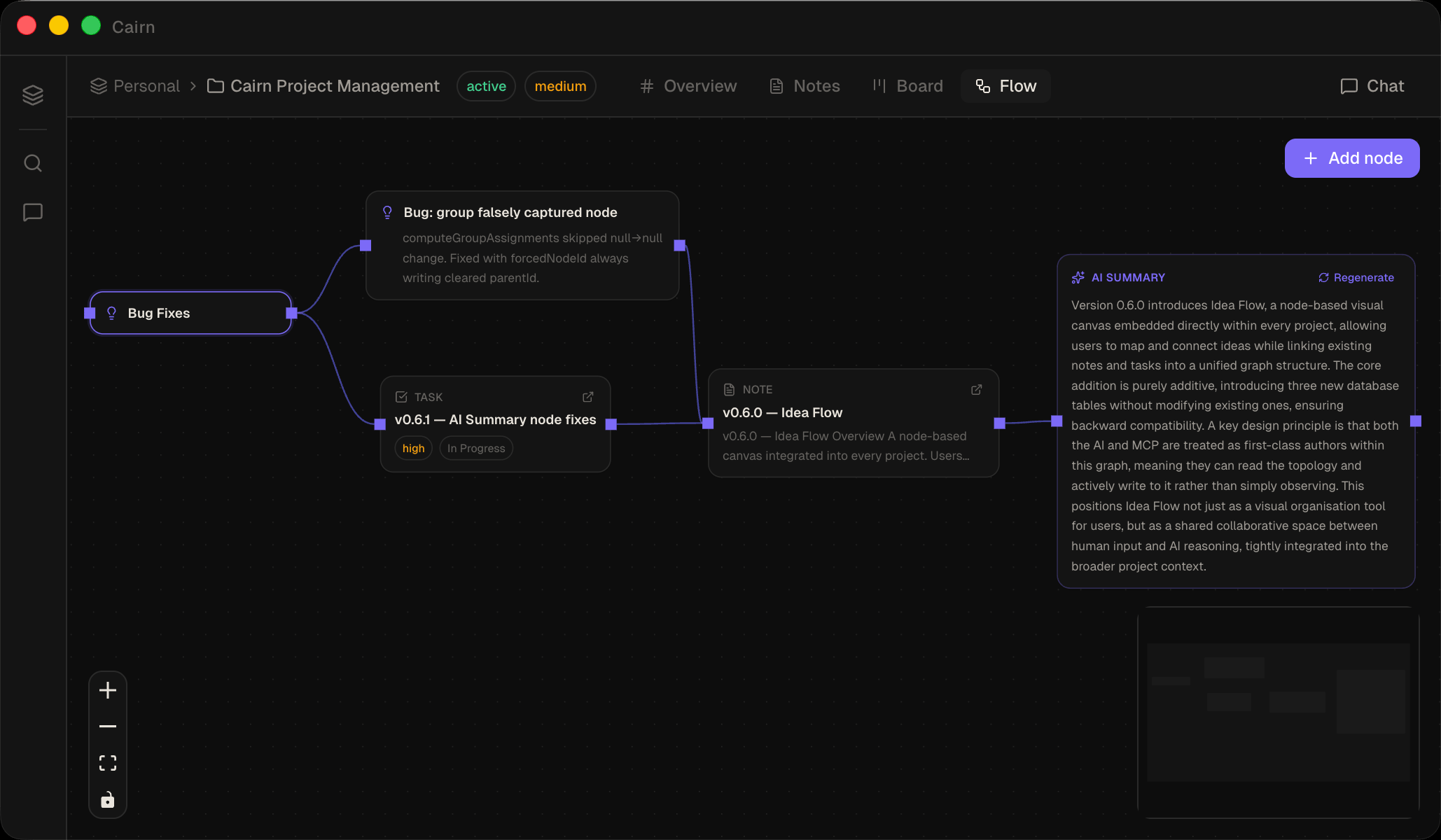
  • Idea, URL, note reference, and task reference node types
  • Group nodes — colour-coded containers; drag nodes in or out to nest and release
  • Auto-layout with a single click — left-to-right or top-to-bottom
  • AI Summary node generates summaries from any connected subgraph
  • Promote an idea directly to a board task — edges re-wired automatically
  • URL nodes fetch Open Graph metadata with one click
  • Drag a note or task from the sidebar to create a reference node instantly
  • Full MCP/AI access — build and connect nodes from the AI chat or any MCP client
Read the Idea Flow docs
Idea Flow canvas
Knowledge Graph

Everything you know, connected

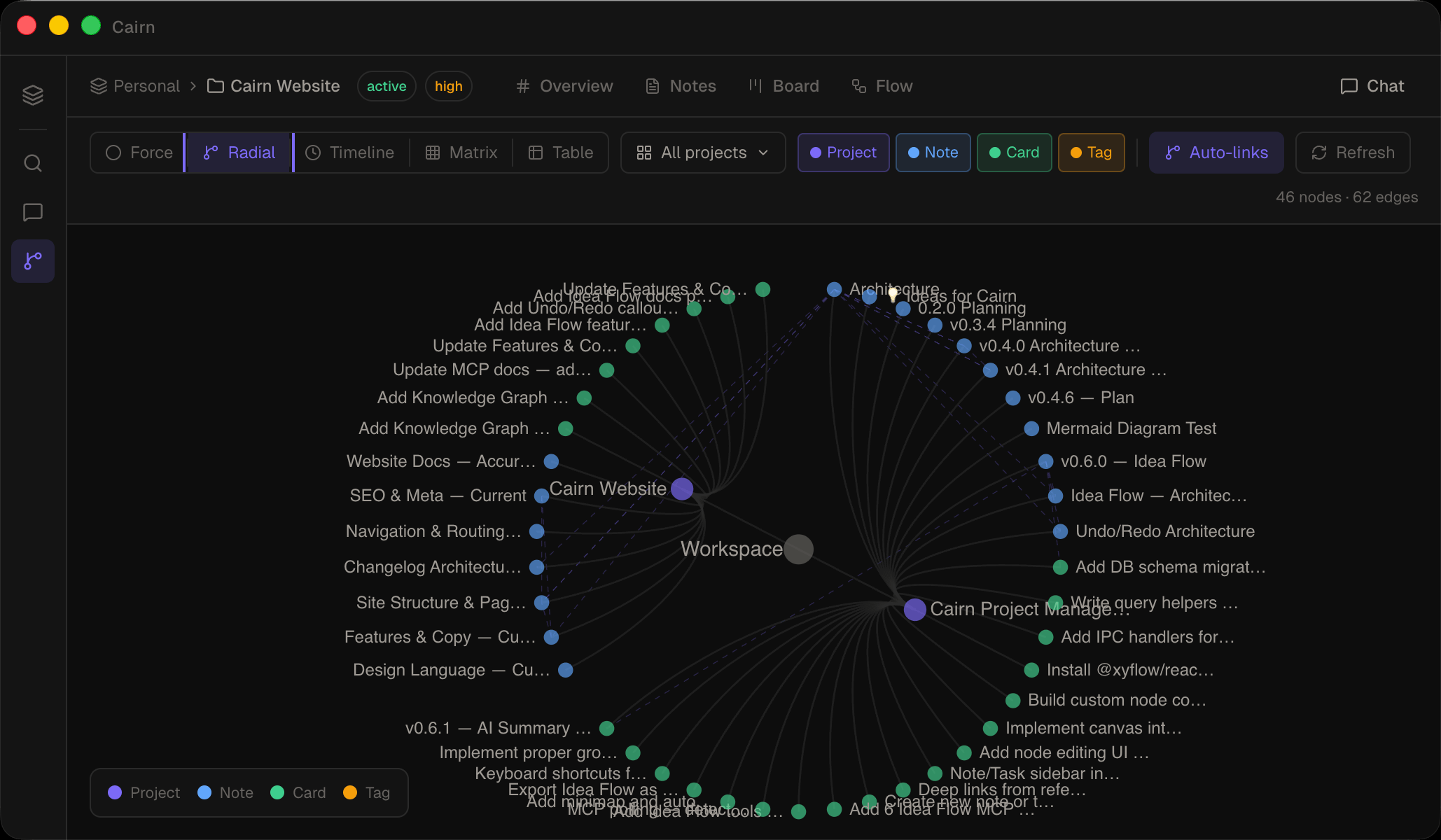
A workspace-level view of every relationship between your notes, tasks, projects, and tags. Switch between a force-directed graph and a radial hierarchy tree, with auto-discovered co-mentions, keyword similarity, and shared assignees.

  • Force graph — canvas-rendered with soft cluster hulls per project; stays smooth on large workspaces
  • Radial — a drill-down sunburst; click a branch to zoom in, the hub or breadcrumb to zoom back out
  • Click to spotlight — highlight everything linked to a note, card, or tag; the rest dims away
  • Click any node to open a detail panel and navigate to the source
  • Filter by project, node type, or relationship type
  • Auto-discovers relationships: co-mentions, keyword similarity, shared assignees, semantic similarity
  • Full MCP access — get_knowledge_graph and get_neighbors for AI research traversal
Read the Knowledge Graph docs
Knowledge Graph
Insights

Seven ways to see your work

A dedicated analytics view that surfaces patterns across every project. A ridgeline of task activity, a beeswarm of due dates, a bullet chart of project health, a Sankey of task flow through your pipeline — and three more. All scoped to whatever projects you care about.
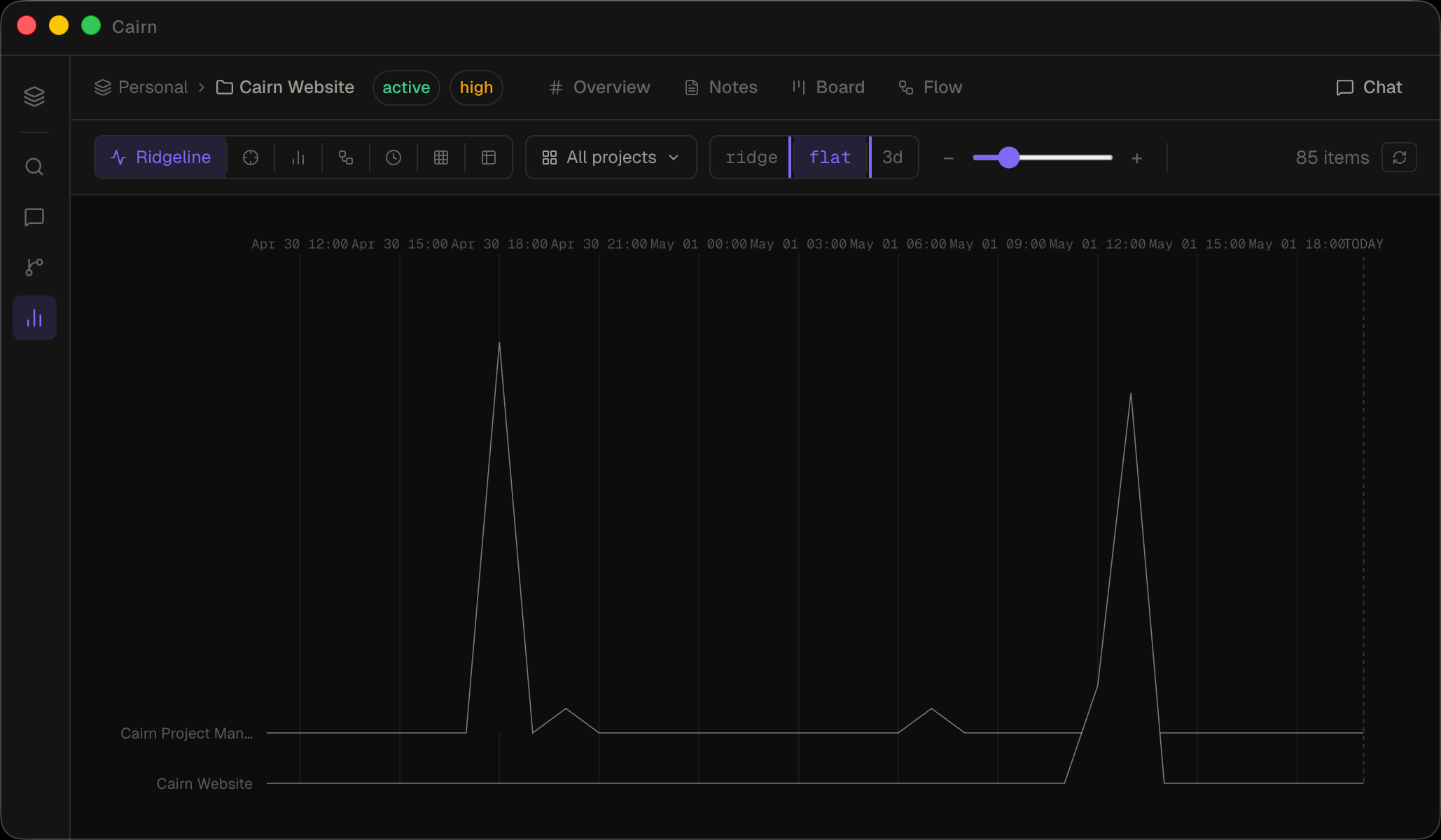
  • Ridgeline — task activity as a joy plot, one row per project
  • Beeswarm — tasks on a shared time axis; dot size encodes priority
  • Bullet — completion bars with urgency bands and overdue markers
  • Sankey — task flow from Backlog to Done; click a stage to inspect
  • Timeline — all tasks with due dates sorted chronologically
  • Matrix — tag co-occurrence heatmap; hover to preview, click to pin
  • Table — flat sortable list across all notes, tasks, and projects
Read the Insights docs
Insights view
Automations

Background work, on a schedule

Schedule agent tasks that run while Cairn is open — a morning brief, a weekly review, an inbox tidy-up. Build the schedule visually, run on auto or approve each write, and watch what each run produced.
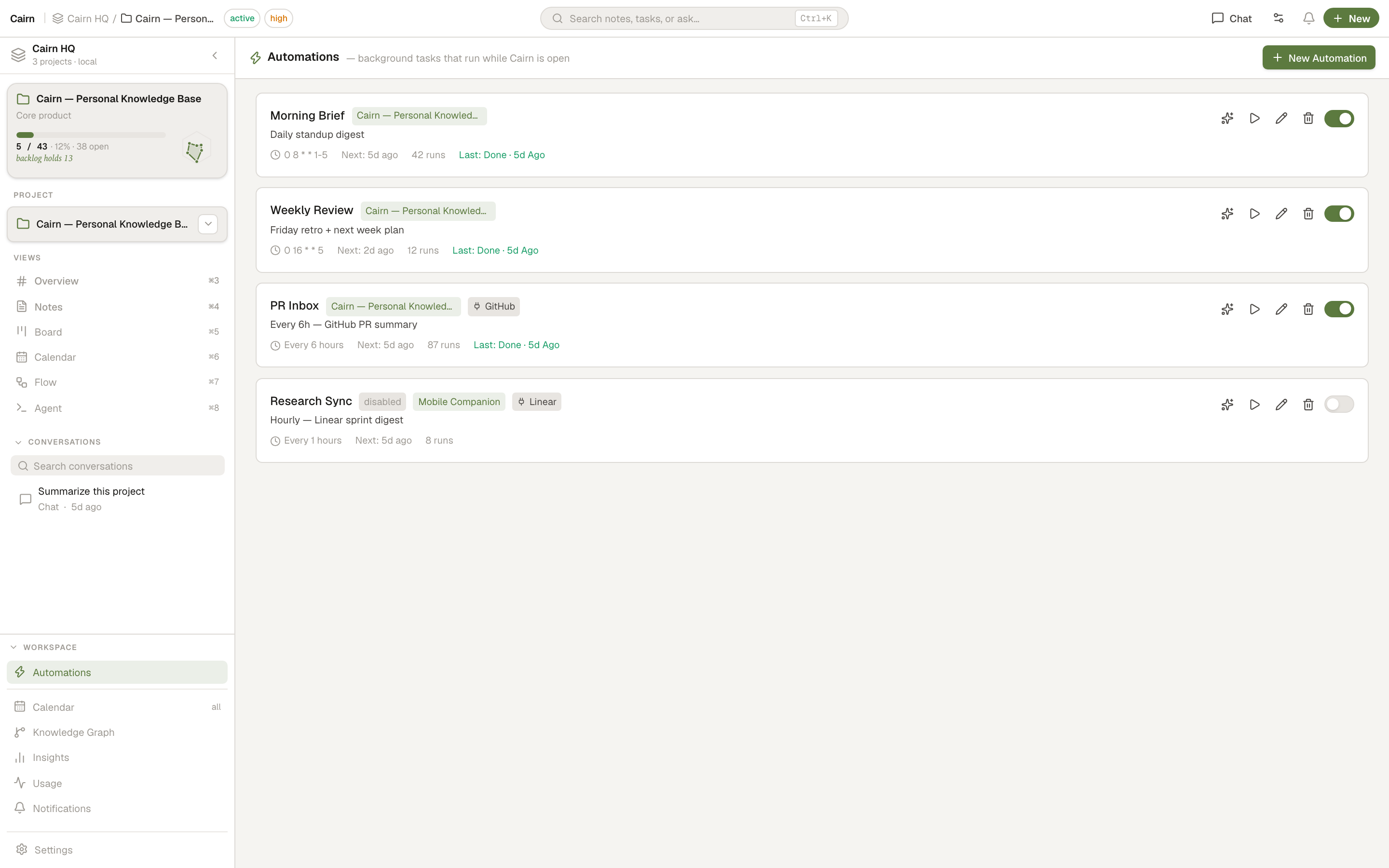
  • No cron — interval, daily, weekly day toggles, monthly, or a one-off, with a live next-run preview
  • Start from a community recipe (Linear sprint digests, GitHub PR summaries, Slack recaps) and tweak it
  • Ask mode parks every write in an approval inbox; external connector calls are always gated
  • Run history with live status, and the notes/cards each run produced — click through to the result
  • In-app notification center — the title-bar bell shows unread activity, approvals, and completions
Read the Automations docs
Automations view
Usage

See exactly what your AI costs

A local record of every LLM and agent call — tokens, cost, and request volume across chat, the agent, subagents, automations, and the one-shot AI features. Nothing leaves your machine.
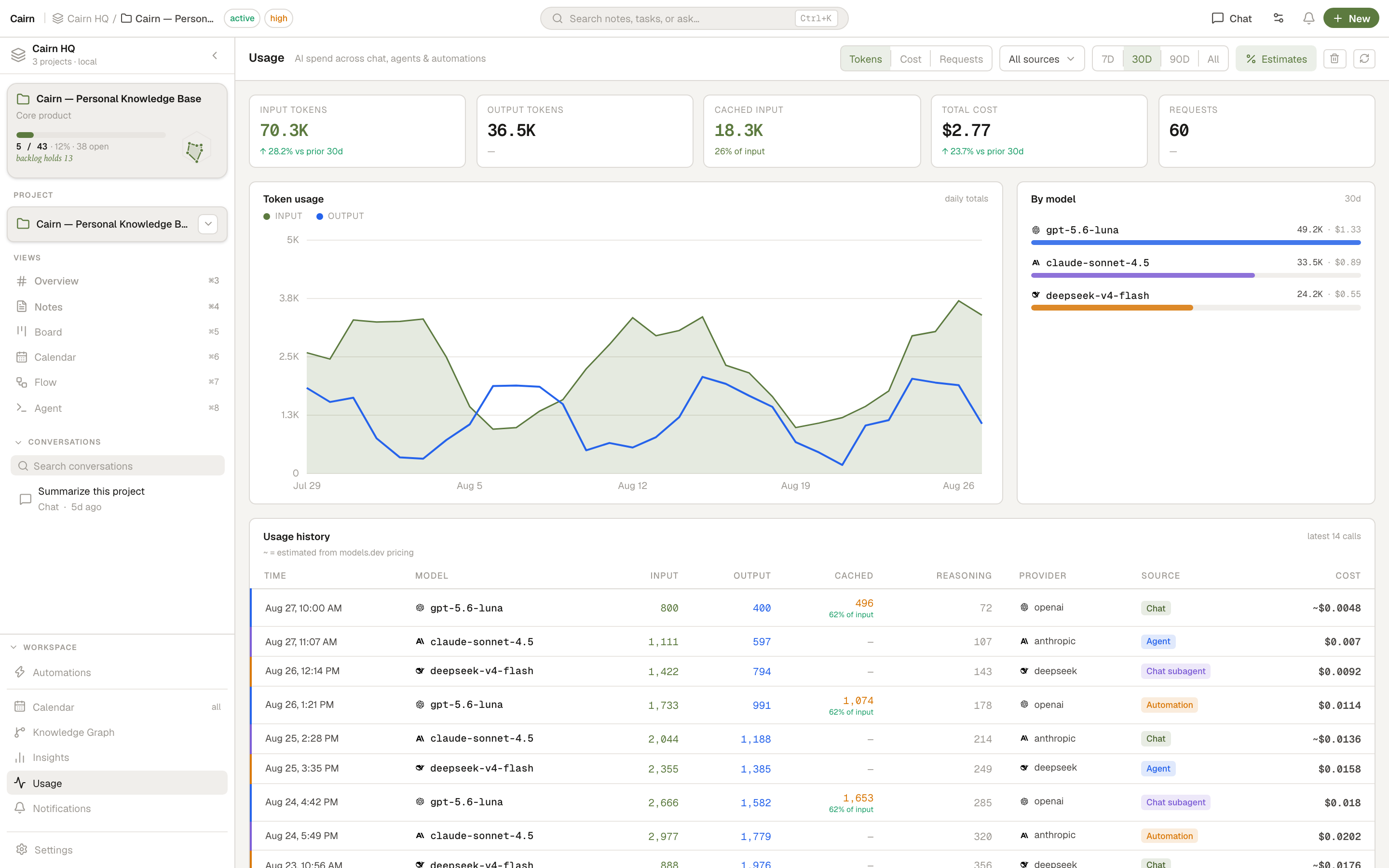
  • Daily token chart with Tokens / Cost / Requests views and per-day hover breakdowns
  • By-model spend list with provider logos, and a per-call history table
  • Prompt-cache tracking — cached input tokens and the percentage they save, colour-coded
  • Provider-reported cost, or a ~ estimate from models.dev pricing you can toggle off
  • Switch providers right from the chat quick-settings
Read the Usage docs
Usage view
MCP Server

Your project, reachable from any AI client

Cairn ships a bundled MCP server. Connect Claude Desktop, OpenCode, Cursor — or any MCP-compatible client — and give your AI direct read/write access to your notes and tasks.

Writes appear in the Cairn UI instantly. No restart, no sync delay. 50 tools — including patch_note for surgical edits — let the AI replace exactly what changed, without re-sending the whole document.

Read the MCP docs
// .opencode/config.json
{
  "mcp": {
    "cairn": {
      "type": "local",
      "command": [
        "/Applications/Cairn.app/Contents/Resources/app.asar.unpacked/dist-mcp/cairn-mcp"
      ],
      "enabled": true
    }
  }
}
External Tools · MCP Client

…and any AI tool, reachable from Cairn

The reverse direction, too. Connect Cairn's own AI chat and coding agent out to remote MCP servers and any HTTP API — sign in with OAuth, or install a ready-made connector from the community registry in one click.

  • Remote MCP servers over SSE or streamable-HTTP, with per-tool enable toggles
  • OAuth 2.1 sign-in for Figma, Linear, Notion, GitHub, Canva and more — tokens in your OS keychain
  • Build a tool from a plain-English description — the AI probes the endpoint and writes the schema
  • Browse a community catalog of connectors; attach each tool per-project
Read the External Tools docs
// Settings → Tools → Add server
{
  "name": "Linear",
  "url": "https://mcp.linear.app/sse",
  "transport": "sse",
  "authMode": "oauth"
}
// → click "Sign in", approve in browser, done.
// Tokens are stored in your OS keychain.

Undo works everywhere

Full undo/redo across notes, board, and Idea Flow. The command pattern coalesces rapid typing into a single undo step, and skips text inputs that handle it natively.

  • Cmd Z / Cmd Shift Z across notes, board tasks, and Idea Flow
  • 2 s coalescing for note edits — rapid typing is one undo step
  • History cleared on AI/MCP writes — use chat to revert AI changes

How Cairn compares

Cairn Notion Linear Obsidian
Local-first
Plain markdown files
Kanban board
AI chat built in
MCP server
No account required
Free Freemium Freemium
Knowledge graph Partial
Coding agent workspace

Frequently asked

Yes. Cairn is free and open source.

In a folder you choose on your own machine. A SQLite database and plain markdown files — nothing leaves your computer unless you put the folder in a cloud-synced location yourself.

Completely. The app, the board, the notes, and the AI chat (using the built-in offline llama.cpp server, or a local endpoint like Ollama) all work without internet.

On-device Llama (via integrated llama.cpp), or any OpenAI-compatible endpoint. That includes OpenAI GPT models, Anthropic Claude (via compatible proxies), Ollama (local), and LM Studio (local).

Model Context Protocol is an open standard for giving AI assistants access to external tools. Cairn ships a bundled MCP server so tools like Claude Desktop, OpenCode, or Cursor can read and write your notes and tasks directly.

macOS, Windows, and Linux. Built with Electron.